This article is part 2 of a series. Read part 1, What is an electric cultivator?
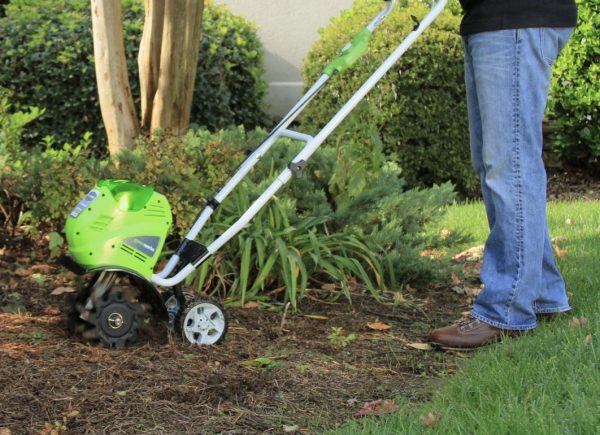 An electric cultivator in a garden bed, with a person who is preparing to use it. Source: Greenworks.com
The Tacoma Tool Library has several electric cultivators made by Greenworks. They use an extension cord (not a battery) and you start the cultivator by pushing a button, not pulling a cord. You can adjust the width of the tines, so you can dig an area that is 11 inches wide or 16 inches wide. You can also adjust the depth, so you can dig up to 8 inches deep.
About our Greenworks electric cultivators
The electric cultivators that you can borrow from the Tacoma Tool Library use an extension cord, not a battery. If you need to use a cultivator in a location that is very far from an outlet, you will need a long extension cord. The company that makes the cultivators recommends that you use a 12-gauge extension cord with these cultivators. If you use an extension cord that isn’t powerful enough, the cultivator will not work very well, and it might overheat and damage the cultivator.
You need to pay attention to the cord when you use the cultivator. If you run over the cord, the cultivator’s tines will cut it.

Before you start using the cultivator
You should always read the manual before you use a new tool.
If you borrowed a different cultivator from the Tacoma Tool Library, you can look it up on our tool catalog to find a link to the manual for that cultivator.
Safety
- Use eye protection such as safety glasses when using the electric cultivator. It can kick up rocks or other items in the soil, and injure your eyes.
- Other people must be at least 15 feet away from the tool when you are using it. Other people can also be injured by rocks or other items in the soil.
- Keep children and pets far away from the tool when you are using it.
- Wear closed-toed shoes, not sandals.
- Make sure the cord and plug are not damaged or wet.
Always read the manual of your cultivator for more information!
How to adjust the cultivator
On some cultivators, you can adjust the depth and width of the cultivator.
Make sure the cultivator is unplugged and that the power switch is off before you adjust it. When you adjust the cultivator, you will be touching the tines. If the cultivator is plugged in when you adjust it, there might be an accident that causes an injury.
Adjust the depth
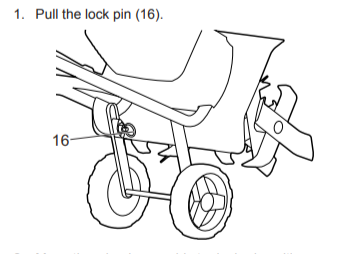
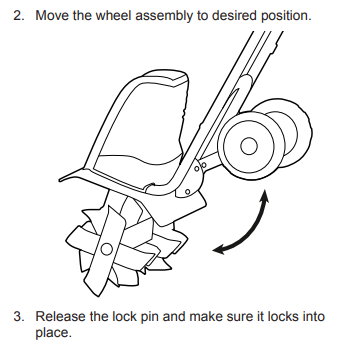
To change how deep the cultivator will dig, change the position of the wheels.
- Unplug the cultivator.
- Pull the lock pin.
- Move the wheels up or down.
- Let go of the lock pin, and make sure it is locked again.
Adjust the width
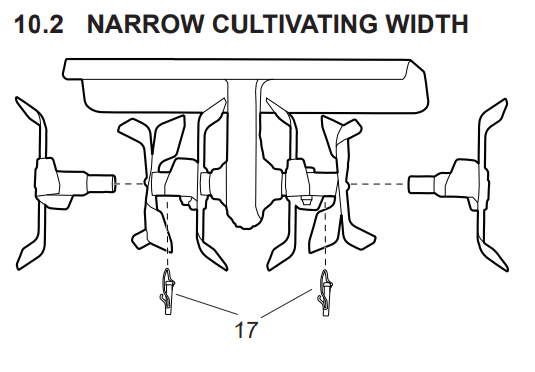
To change how wide an area the cultivator will dig, you can remove the outer tines.
- Unplug the cultivator.
- Remove the self-locked nuts from the tines. These are #17 in the picture.
- Put the nuts somewhere safe so you don’t lose them.
- Remove the outside tines.
- Don’t forget the tines and the nuts when you return the cultivator to the tool library!
How to start the electric cultivator
- Make sure your adjustments are secure.
- Put on safety glasses, and make sure other people are at least 15 feet away.
- Plug in the cultivator.
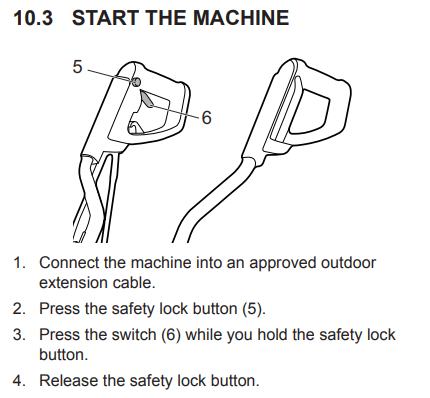
- Press and hold the safety lock button (#5 in the picture).
- While you are still pressing the safety lock button, press the switch (#6 in the picture). The cultivator will start.
- You can now let go of the safety lock button.
How to stop the electric cultivator
To stop, let go of the switch. The cultivator will stop.
Using the electric cultivator
- If you adjusted the depth or height of the cultivator, make sure your adjustments are secure.
- Put on safety glasses, and make sure other people are at least 15 feet away.
- Plug in the cultivator.
- Set the cultivator on the ground where you want to start digging.
- Turn on the cultivator. The tines will start turning.
- Tilt the cultivator forward so the tines dig into the ground, and start pushing the cultivator forward. Go slowly until you learn how it works.
- Walk forward and push the cultivator forward until you get to the end of the area you want to dig.
In this video by DIYwithWayne, the chapters called “Tilling” and “Demo” show how to use an electric cultivator. The cultivator in the video is similar but not the same as the TTL’s Greenworks cultivators.
Tips for using the cultivator
- You might not be able to dig as deeply as you want the first time you use the cultivator in an area. You may need to use the cultivator more than one time in the same area. Don’t try to dig very deeply on the first try, especially if it isn’t easy to do.
- If the cultivator jumps, try moving a little bit faster.
- If the cultivator gets stuck and stays in one place, try rocking it from side to side.
- If the soil is very hard, you should water the soil, wait one or two days, and then use the cultivator.
- Don’t use the cultivator if the soil is very wet. It is bad for the soil and also can damage the cultivator. If it rains, you should wait one or two days before you use the cultivator.
If you are having problems using the cultivator
| Problem | Possible cause | Solution |
|---|---|---|
| The motor doesn’t start. | The power cord is not plugged in, or is not plugged in all the way. | Plug in the power cord. |
| The circuit breaker is tripped. | Check circuit breaker. | |
| The cultivator smokes while you’re using it. | The cultivator is damaged. | 1. Immediately stop using the cultivator. 2. Unplug the cultivator. 3. Return it to the Tacoma Tool Library and tell us what happened. |
| The motor works, but the tines don’t move. | The cultivator is damaged. | Don’t use it. Return it to the Tacoma Tool Library and tell us what happened. |
| The tines are blocked. | 1. Unplug the cultivator. 2. Remove the item(s) blocking the tines. |
Borrow the TTL cultivators
To borrow the Tacoma Tool Library’s brand-new Greenworks cultivators, go to our library catalog to place a reservation.
If you’re not a member of the Tacoma Tool Library yet, start by creating your membership.
Sources
- Cultivator vs. Tiller: Which Is Best for Your Garden? BobVila.com. Updated Oct 23, 2021; accessed July 22, 2025.
- Dig In: A Cultivator vs Tiller for the Garden. Lowes.com. Updated February 13, 2024; accessed July 22, 2025.
- Greenworks Cultivator operator manual. Received via email from Greenworks customer support, July 22, 2025.
No AI/LLM was used to write this article.
 Tacoma Tool Library is funded by WA State Department of Ecology with funding from Washington’s Climate Commitment Act. The CCA supports Washington’s climate action efforts by putting cap-and-invest dollars to work reducing climate pollution, creating jobs, and improving public health. Information about the CCA is available at www.climate.wa.gov.